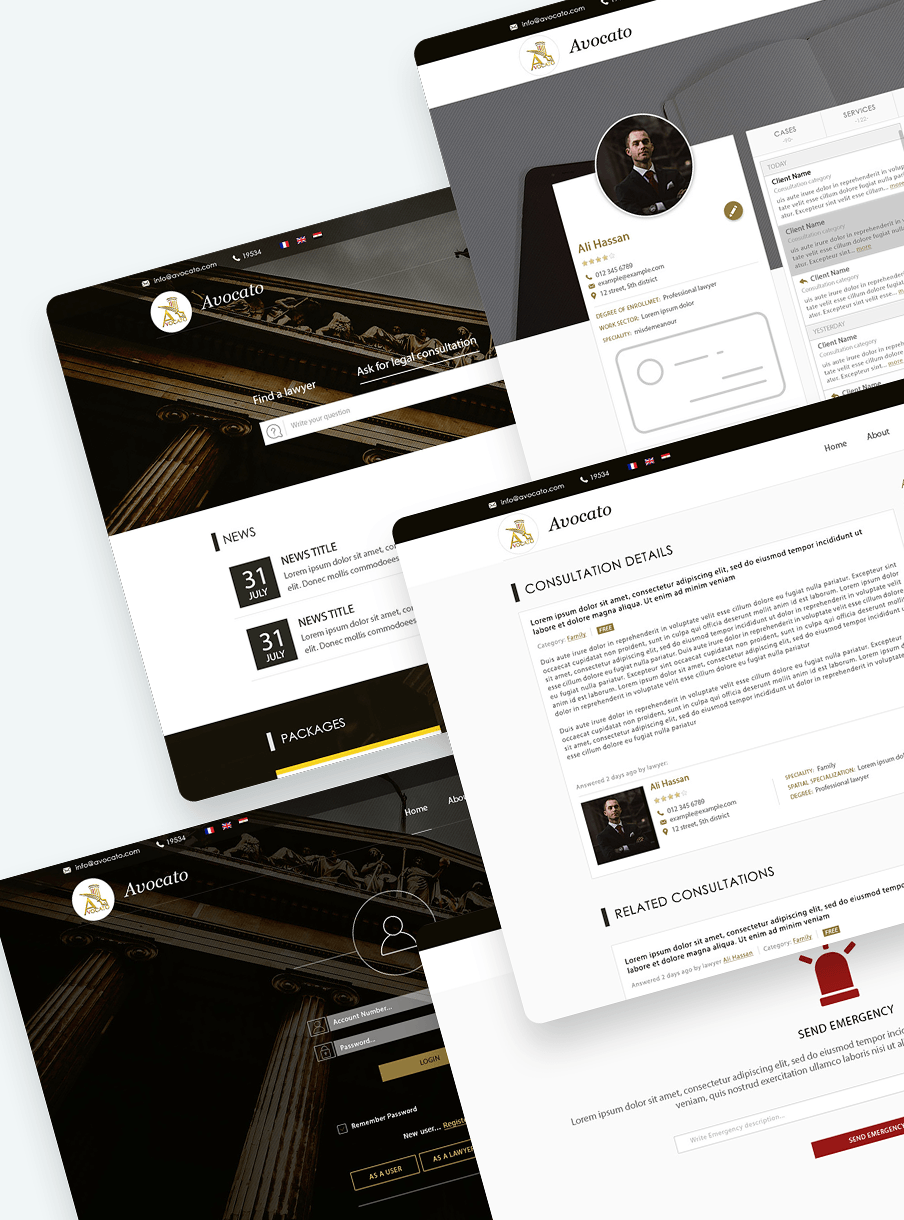
02
← All work
UI/UX case study · Web app

Avocato app

A platform that provides specialized legal services that facilitate dealing with legal issues for everyone.

PhotoshopCSSHTMLJavaScript
01The story

Legal help, made modern

Avocato delivers specialized legal service through an electronic platform, ensuring quality and accuracy before it reaches the client. That helps develop the lawyers' community and introduces qualified lawyers to clients.

Using Avocato is the future of legal services — enlarging, enriching and modernizing the attorney profession instead of the traditional way.
Avocato
0Design principles
0Design thinking stages
0User personas
0Languages
02Design approach

Four principles

01

Data centralization

All legal consultations with their verified answers in one place, quick and easy to navigate when needed.

02

Real time & location

Live location helps users find the right lawyer's availability, while lawyers stay updated with their schedule.

03

User-centered design

Simple, easy-to-use interfaces so both lawyers and users can navigate the platform without hassle.

04

Streamlined workflows

A trusted channel between users and lawyers to provide paperwork, saving time and effort.

03Design thinking

How I got there

1

Empathize

Collaborated with the product owners to understand the target audience — lawyers and clients — ensuring the design resonated with their backgrounds and needs.

2

Define

Identified the challenge: crafting a usable, highly functional web app for busy professionals, with an interface that fulfills emergency usage and builds trust between lawyers and clients for a professional relationship.

3

Ideate

Studied successful apps like lawyers.com to understand how they build trust, analyzing the strengths and weaknesses of their layouts. Applied those insights to design a distinctive portal that reflected the client request.

4

Prototype

Designed mockups, UI designs and interactive prototypes for the dev team, and delivered prototypes for usability testing to gather feedback and improve the UI.

5

Test

Tested the product with the quality control team and real users, and did the final review before launch.

04Meet the users

Two people, one platform

ZM

Zaki Malik

CEO of international trade company
Age
41 years
Location
Cairo, Egypt
Experience
7 years of practice

Background

Founder and CEO of an international trade company that usually imports children's toys from China to distribute to local stores. He needs lawyer assistance multiple times during his process.

Goals

Quick search to a legal consultation in multiple settings to help facilitate his trade process.

Challenges

Difficulty maintaining regular communication with his lawyer for follow-ups and updates.

AN

Adam Noah

Attorney General
Age
38 years
Location
Cairo, Egypt
Experience
7 years of practice

Background

Works at a private attorney office with a busy schedule, managing about 5–9 clients daily. He struggles with fragmented client paperwork spread across locations, leading to time-consuming searches during consultations.

Goals

  • Quick access to client data through a centralized platform for history and documents.
  • Meet new clients online or in the nearest location.
  • Efficient time management by streamlining administrative tasks.

Challenges

  • Fragmented records slow down appointments.
  • High administrative load from paperwork and records.
  • Difficulty keeping regular communication for follow-ups.
05User flow

Mapping the journey

ClientClient access→Choose action→Hire lawyer→Service completed
EmergencyClient access→Announce emergency→Nearest lawyer notified
ConsultationAsk legal consultation→Request sent→Lawyer responds→Lawyer answers→Service completed
LawyerRegistration→Choose plan→Paid plan? Yes: create verified account · No: payment process→Account created
06Screens

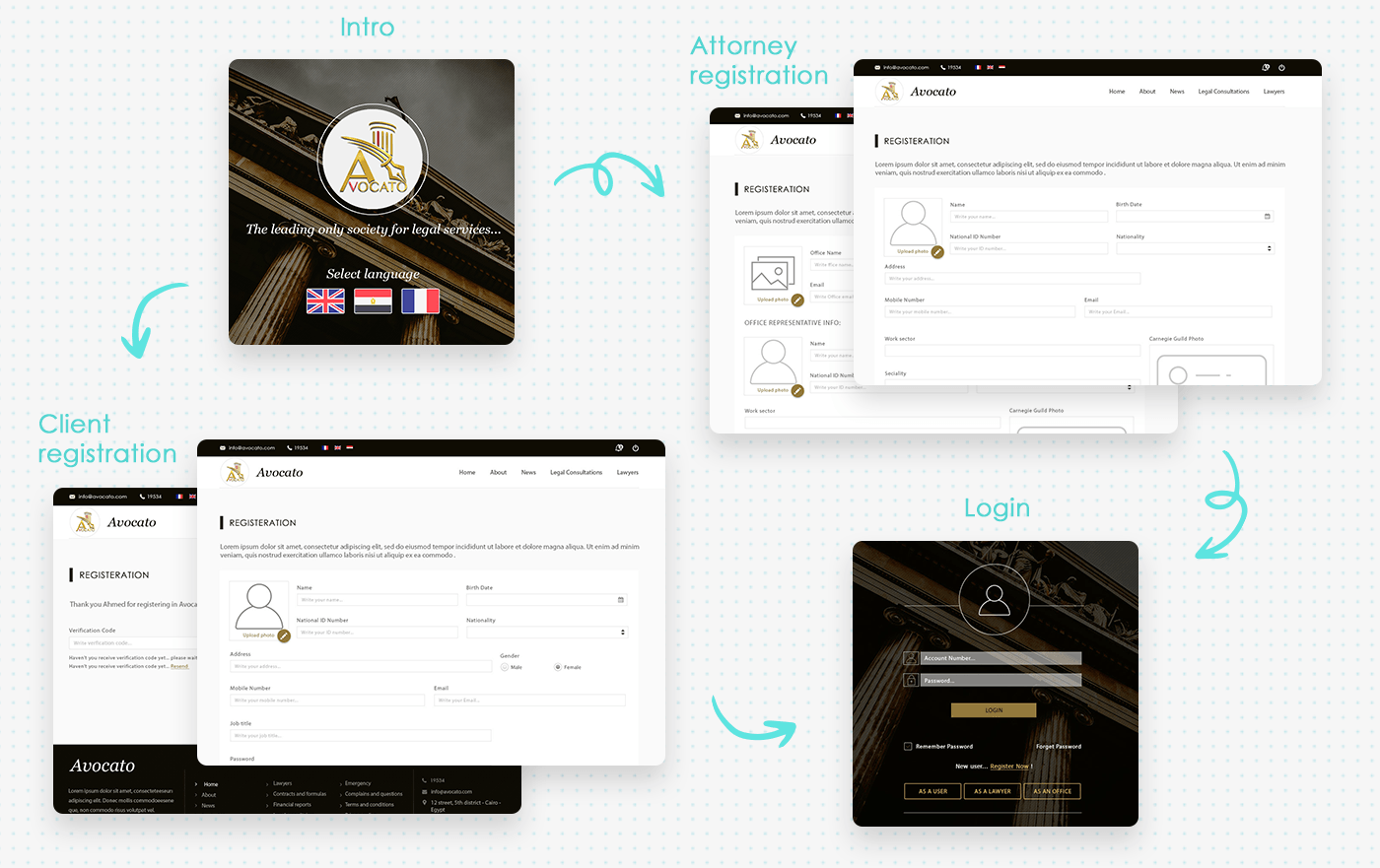
From first hello to login

Intro

Choose your language

A welcome screen with the tagline and a language select: English, Arabic and French.

Client

Client registration

Profile photo, personal details, then a verification code step.

Attorney

Attorney registration

Personal and office representative info, work sector, speciality and guild photo.

Login

Login

Account number and password, with entry paths as a user, a lawyer or an office.

Avocato Screens
07Feature insights

Easy navigation, interactive details

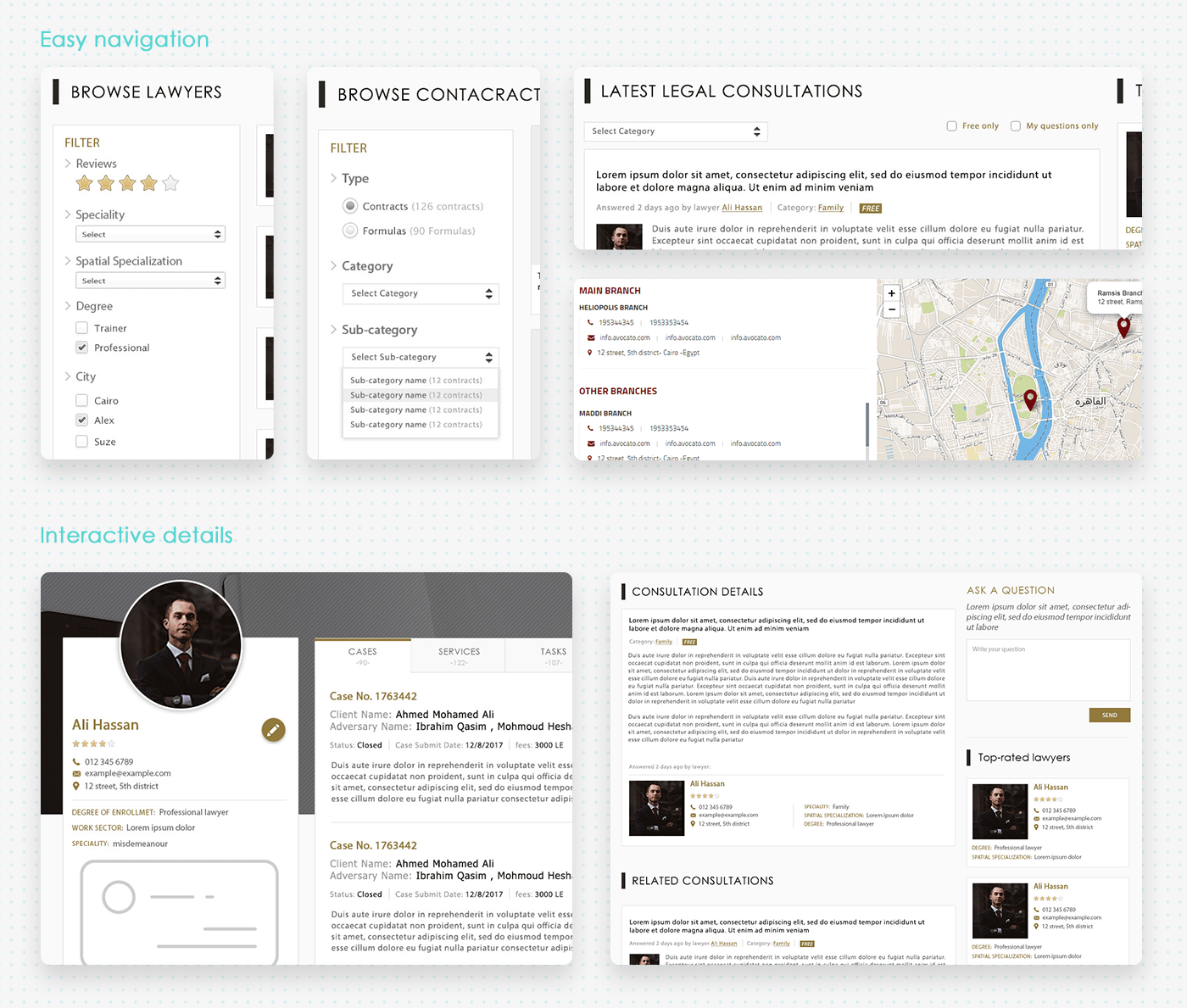
Easy navigation

Browse & filter

Filter lawyers by reviews, speciality, spatial specialization, degree and city. Contracts and formulas filter by type, category and sub-category.

Easy navigation

Latest consultations & branches

Consultations filter by category, free only, or my questions only. Branches show on a map with contact details.

Interactive details

Lawyer profile

Rating, contact, degree of enrollment, work sector and speciality, plus tabs for cases, services, tasks, clients and consultations.

Interactive details

Consultation details

The full answer from a lawyer, related consultations, an ask-a-question box and top-rated lawyers.

Navigation in Avocato app
08The outcome

How Avocato helped

The client

Each step replaced a scramble with a clear path.

  1. Ask for a legal consultation and get a response from a verified lawyer.
  2. Find the perfect lawyer based on verified profiles and user reviews.
  3. Send an emergency so the nearest lawyer gets notified.

The lawyer

Fragmented paperwork became one workspace.

  1. Easily keep track of all the work, with updated status.
  2. Easily find ready-to-use templates of contracts and formulas.
  3. Submit finances for each task.

Thanks for reading

Avocato app · UI/UX case study 02

Back to selected workNext: Form Builder →